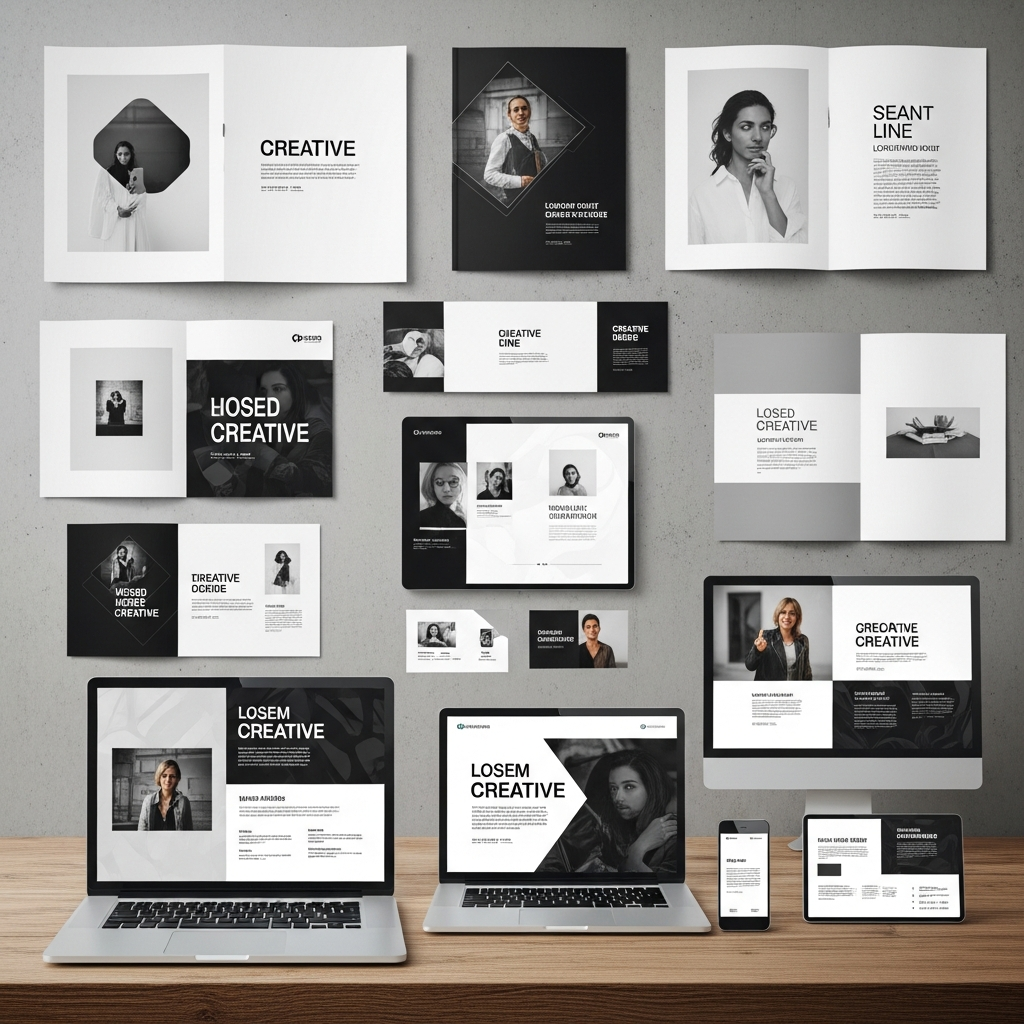
Graphic Design Templates are pre-made, professionally designed layouts that users can easily modify, customize, and adapt for their own specific content and branding needs. This essential tool allows individuals and businesses without formal design training to create high-quality visual assets quickly and consistently. They save countless hours and resources, acting as a powerful foundation for everything from a simple social media post to a complex business presentation.

Why Graphic Design Templates Are a Game-Changer for Modern Business
In the fast-paced world of digital communication, visuals are no longer optional; they are a fundamental requirement for connecting with an audience. However, not every small business owner, content creator, or marketing professional has the time or budget to hire a full-time designer for every single asset they need. This is precisely where Graphic Design Templates step in to democratize the creation process.
The ability to maintain a consistent brand identity across all platforms is paramount, and these templates ensure that consistency without requiring a design degree. A well-chosen Graphic Design Template acts as a blueprint, guaranteeing that the logo is in the right place, the brand colors are correct, and the typography adheres to the established style guide, even when different team members are responsible for creating the content. This systematic approach eliminates the guesswork and the potential for off-brand messaging. Furthermore, the largest benefit of utilizing platforms with robust template libraries is the dramatic reduction in time spent on repetitive tasks. Instead of building every image from scratch, teams can focus their energy on developing compelling content and refining their marketing strategy, knowing that the visual foundation is already solid.
Moreover, the financial benefit of relying on quality Graphic Design Templates is substantial. For startups or small enterprises operating on a lean budget, the recurring cost of external design agencies or freelance designers can quickly become prohibitive. Investing in a subscription to a template platform, or even utilizing free resources, provides an immediate, cost-effective solution for a high volume of visual needs. Templates make it possible to produce materials like business cards, social media ads, and email headers that meet professional specifications instantly, a level of efficiency bigger businesses also benefit from through systemic design processes. In essence, they provide a premium look without the premium price tag. The visual quality of the output remains high because the initial design structure was created by a seasoned professional, giving even novice users access to sophisticated aesthetics.
I remember when I first started my online journey years ago. I was so focused on the writing that I neglected the visuals, thinking they were secondary. My early social media posts were amateurish, lacking any cohesion. I felt intimidated by professional design software and spent days trying to create a single banner. Then, a colleague introduced me to the world of Graphic Design Templates. I was skeptical at first, worried that my content would look generic. But as I explored the vast libraries of Graphic Design Templates available, I realized they weren’t about copying; they were about customizing. The templates gave me a framework—a professional starting point—and I was able to quickly inject my brand’s personality through color, images, and text. I saved so much time that I was able to triple my content output, and my engagement rates immediately started to climb because my visuals finally matched the quality of my writing. This experience taught me that Graphic Design Templates are not a shortcut; they are an essential leverage point for achieving scalability and visual excellence.
Deconstructing the Anatomy of Graphic Design Templates
To truly appreciate the value they offer, it is important to understand what makes a high-quality Graphic Design Template work. They are not merely static images; they are sophisticated, layered files designed for maximum flexibility and user-friendliness. The best templates are structured to separate the design elements from the customizable content, making the editing process seamless.
Structure and Flexibility of Graphic Design Templates
A well-crafted template has several distinct components that allow for both speed and extensive modification. This modular structure is what sets professional Graphic Design Templates apart from simple background images. The primary elements that give templates their utility are:
- Layer Organization: All elements—text boxes, image placeholders, background shapes, and icons—are placed on separate, clearly labeled layers. This allows users to manipulate a specific element, such as changing the color of a subtle background texture, without affecting the main image or headline.
- Smart Objects and Placeholders: These features are the heart of efficiency in Graphic Design Templates. Image placeholders allow a user to simply drag and drop a new photo, and the template automatically scales and crops it to fit the designated area perfectly. This eliminates the need for manual resizing and ensures the composition remains intact.
- Editable Text Styles: The text fields are pre-formatted with specific fonts, sizes, and colors that align with the template’s overall aesthetic. Users only need to type their message; the professional typography is already handled. This makes it incredibly fast to generate new flyers, posters, or social media updates using the base Graphic Design Template.
The combination of these features ensures that when you choose a Graphic Design Template, you are adopting a proven visual hierarchy. The template guides the viewer’s eye, placing emphasis on the most important information, a critical aspect of effective communication. The structural integrity of the design is preserved even when content is changed, providing a foolproof way to maintain professional standards across the board.
The Diverse Landscape of Graphic Design Templates
The utility of Graphic Design Templates is not confined to a single medium; they span the entire spectrum of visual communication, from print to digital media. Understanding the most common and powerful types of Graphic Design Templates is key to leveraging their full potential for any marketing or branding strategy.
Social Media Graphic Design Templates
Social media is arguably the most template-heavy domain today. Given the high-frequency posting required across multiple platforms—Instagram, Facebook, LinkedIn, TikTok, and X—the demand for consistently branded Graphic Design Templates is constant.
These templates must be highly adaptable to various aspect ratios and visual styles:
- Stories Templates: Designed vertically (9:16) for maximum mobile immersion, often including placeholders for polls, countdowns, or quick text overlays.
- Feed Post Templates (Square/Horizontal): Used for standard posts, announcements, and advertisements. A well-designed feed Graphic Design Template ensures a cohesive look that makes the entire profile feed visually appealing and recognizable.
- Carousel Templates: Structured to guide the viewer across multiple slides, these Graphic Design Templates require a sense of flow and connectivity between individual cards to create an engaging, educational, or storytelling experience.
The benefit of using these specific Graphic Design Templates is speed. A marketing team can produce a week’s worth of content in a fraction of the time it would take to design each post individually, ensuring the brand stays top-of-mind with a professional image. The consistency delivered by these Graphic Design Templates is vital for building trust and recognition in the crowded social space.
Print and Stationary Graphic Design Templates
Despite the digital shift, physical assets remain critical for many businesses, and Graphic Design Templates are indispensable here as well. These templates are meticulously set up with print-ready specifications, which is a major technical advantage for non-designers.
- Business Card Templates: These are perhaps the oldest form of Graphic Design Templates. They are set with precise dimensions, bleed, and safe zones, ensuring that essential contact information isn’t cut off during the trimming process. The templates are ready for print, allowing a user to bypass complex setup steps.
- Flyer and Poster Templates: Used for local marketing, events, or product announcements. High-quality flyer Graphic Design Templates often incorporate strong visual hierarchies with clear calls to action, making them instantly effective for generating interest and foot traffic.
- Brochure Templates: More complex than flyers, brochure Graphic Design Templates are set up with correct folding mechanisms (bi-fold, tri-fold) and panel organization, ensuring that the content flows logically when the piece is physically handled. The technical precision required for these Graphic Design Templates is a lifesaver for amateur creators.
Using specialized Graphic Design Templates for print ensures that an amateur designer doesn’t accidentally submit files that will be rejected or printed incorrectly by a professional press, saving both time and money on print runs.
Presentation and Document Graphic Design Templates
In the corporate world, effective communication often relies on dynamic visual aids, making Graphic Design Templates for presentations a staple.
- Presentation Templates (Deck Templates): These are comprehensive sets of slides—title pages, table of contents, data visualization slides, quote slides, and thank you pages—all unified by a single design theme. Using a full suite of presentation Graphic Design Templates ensures that a speaker’s message is delivered with visual coherence, significantly boosting credibility.
- Report and Ebook Templates: Longer-form content requires structured layouts to enhance readability. These Graphic Design Templates include pre-designed page layouts, chapter headings, call-out boxes, and image placements. They ensure a professional, cohesive look for digital documents, reports, and lead magnets, making dense information more accessible and engaging for the reader.
The uniformity of these Graphic Design Templates is what translates directly into perceived professionalism. When every slide or page adheres to the same set of visual rules, the audience focuses on the message, not on a confusing array of mismatched visuals.
Staying Current: Graphic Design Templates and the Latest Visual Trends
The world of design is constantly evolving, and the value of Graphic Design Templates is directly tied to their ability to incorporate modern trends. Reputable template platforms continually update their libraries to reflect the freshest aesthetic choices, ensuring users don’t look dated. Staying ahead of the curve means adopting Graphic Design Templates that feature current styles.
Embracing 2025 and 2026 Aesthetic Movements
Current and upcoming trends emphasize designs that are emotionally resonant, dynamic, and reflective of modern values. This is evident in the new waves of Graphic Design Templates hitting the market.
1. Focus on Experiential and Bold Design:
- Maximalist Illustration & Eclectic Maximalism: Templates are moving beyond sterile minimalism. New Graphic Design Templates are incorporating detailed, vibrant, and multi-layered illustrations. These templates use an abundance of color, texture, and visual elements to create a rich, almost overwhelming sensory experience that demands attention.
- Bold Minimalism: This is a paradox where templates use a minimal number of elements but execute them with bold colors and large, assertive typography. This style of Graphic Design Templates is visually striking, using geometric shapes and clean lines with a punchy, aggressive palette to make a clear, instant statement.
2. Dynamic and Textural Elements:
- Motion Graphics and Animation: The most advanced Graphic Design Templates are now being offered as short videos or animated graphics. These templates introduce subtle movement, such as shimmering metallics or smooth transitions, that significantly boost engagement on social media and landing pages.
- Textured Grains and Gradients: Templates that incorporate subtle noise, grainy textures, or fluid color gradients are gaining immense popularity. These Graphic Design Templates avoid a flat, digital feel, adding an organic, tangible quality to the visuals. Gradients, in particular, blur the lines of design and add depth without requiring complex shading.
3. Conceptual and Conscious Design:
- Personalization and Inclusivity: The future of Graphic Design Templates is hyper-focused on allowing easy customization for diverse audiences. Modern Graphic Design Templates offer greater flexibility for image placeholders and color palettes to reflect personalization and ensure the brand’s visuals are inclusive and tailored to specific user segments.
- Eco-Conscious and Sustainability Themes: Templates are trending toward natural, earthy palettes and designs that utilize organic shapes and textures, reflecting a growing consumer preference for sustainability. These Graphic Design Templates help brands visually communicate their commitment to environmental responsibility.
When selecting a library of Graphic Design Templates, a user should seek platforms that clearly demonstrate an awareness of these emerging trends. Choosing a Graphic Design Template that embodies a contemporary style ensures the brand remains relevant and visually sophisticated.

Mastery of Graphic Design Templates: Customization Best Practices
The difference between looking professional and looking generic often lies not in the choice of a Graphic Design Template, but in the method of its customization. The inherent power of Graphic Design Templates is their capacity for transformation; they are intended as a launchpad, not a finished product.
Five Key Steps to Template Transformation
For the most impactful use of Graphic Design Templates, users should follow a rigorous customization process that ensures the final product is unique and perfectly aligned with the brand.
1. Apply a Consistent Color Palette Immediately:
Before adding any content, modify the primary, secondary, and accent colors within the Graphic Design Template to match the brand’s specific hex codes. This one step instantly takes ownership of the design. A professional Graphic Design Template will have global color controls, allowing a user to change all instances of a specific color simultaneously, guaranteeing brand consistency.
2. Standardize Typography:
Every brand has a voice, and that voice is visually represented by its fonts. Replace the template’s default fonts with the brand’s chosen typeface (e.g., changing a bold sans-serif to a classic serif). Pay close attention to the visual hierarchy, ensuring that the heading font and body text font chosen for the Graphic Design Template work well together and maintain the original template’s emphasis.
3. Inject Branded Imagery:
The images in a Graphic Design Template are placeholders. Replace them with high-quality, relevant, and unique photography or graphics that tell the brand’s story. If the template uses flat, vector illustrations, replace them with illustrations that match the brand’s distinct style, even if it requires a slight modification to the original Graphic Design Template. The visual appeal of the final product hinges on the quality of the inserted media.
4. Adjust Layout for Data and Text Flow:
Resist the urge to cram too much text into a design. Graphic Design Templates are designed with visual breathing room, or ‘white space.’ If your text is longer than the template’s example, consider either editing the text to be punchier or carefully adjusting the layout to accommodate the content without sacrificing readability. This is a critical point: the efficiency of the Graphic Design Template should not override the clarity of the message.
5. Add Unique, Subtle Elements:
To truly make a Graphic Design Template your own, introduce a unique brand element. This could be a subtle pattern in the background, a distinctive icon set, or a border that frames the content. These small, proprietary touches ensure that even if others use the same base Graphic Design Template, your final visual output is unmistakably yours. For example, a travel brand might add a subtle compass icon to the corner of all their Graphic Design Templates.
By treating Graphic Design Templates not as the final destination but as a high-speed vehicle, users can rapidly produce unique, professional-grade visuals at scale.
The Future Trajectory of Graphic Design Templates
The ongoing evolution of visual tools promises to make Graphic Design Templates even more powerful and intuitive. The line between professional design software and user-friendly template platforms continues to blur, creating exciting possibilities for content creators everywhere.
We are moving towards a landscape where Graphic Design Templates are not just drag-and-drop assets, but dynamic tools that learn and adapt. The integration of advanced computational capabilities is starting to allow a Graphic Design Template to automatically suggest color palettes, adjust layouts based on content length, and even resize and reformat the entire design suite across a dozen different social media aspect ratios with a single click. The goal is ultimate efficiency: minimizing the repetitive tasks associated with scaling content across multiple channels.
Furthermore, the complexity of Graphic Design Templates will continue to increase without sacrificing usability. We will see more Graphic Design Templates that are inherently interactive—designed for augmented reality experiences, immersive 3D presentations, and dynamic data visualization that automatically updates. These sophisticated Graphic Design Templates will empower users to create cutting-edge digital experiences that were previously only accessible to users with advanced design, coding, and motion graphics skills.
The continued rise of Graphic Design Templates is a clear indication that the demand for high-quality, accessible visual communication will only grow. They represent the perfect confluence of professional artistry and user empowerment, ensuring that every message, regardless of the sender’s budget or technical skill, can be delivered with visual impact and authority. The ability to leverage Graphic Design Templates effectively will soon be a fundamental skill for anyone operating in the content or marketing space.
Frequently Asked Questions (FAQ)
What are the main advantages of using Graphic Design Templates?
The main advantages of using Graphic Design Templates are significant time savings, reduced costs compared to hiring a designer for every small task, and a guarantee of brand consistency across all visual communication. Templates ensure professional design standards, proper visual hierarchy, and correct technical specifications for both digital and print mediums, empowering even non-designers to create high-quality assets.
How can I ensure my use of Graphic Design Templates looks unique and not generic?
To ensure your Graphic Design Templates look unique, you must dedicate time to rigorous customization. Start by replacing all default colors and fonts with your brand’s specific style guide. Crucially, replace the placeholder images with proprietary, high-quality photos or illustrations that are unique to your brand. Adding a subtle, unique brand element, like a specific icon or pattern, further personalizes the Graphic Design Templates.
What types of businesses benefit most from using Graphic Design Templates?
Virtually all businesses benefit, but Graphic Design Templates are particularly transformative for small businesses, solopreneurs, and marketing teams with high content volume requirements. These templates help maintain a consistent and professional brand image on a limited budget, allowing these groups to compete visually with larger organizations. Any business with frequent needs for social media posts, email headers, or presentation decks benefits immensely from the efficiency of pre-made Graphic Design Templates.
Are there any drawbacks to relying too heavily on Graphic Design Templates?
The primary drawback of relying solely on Graphic Design Templates is the potential for a lack of genuine originality if they are not customized sufficiently. If a user simply swaps out the text and leaves the default styling, the design will look generic. Another potential issue is the lack of a highly complex or unique visual identity that requires a ground-up design approach, which a template cannot easily accommodate. The best approach is to use Graphic Design Templates as a customizable foundation, not as a final, uneditable product.