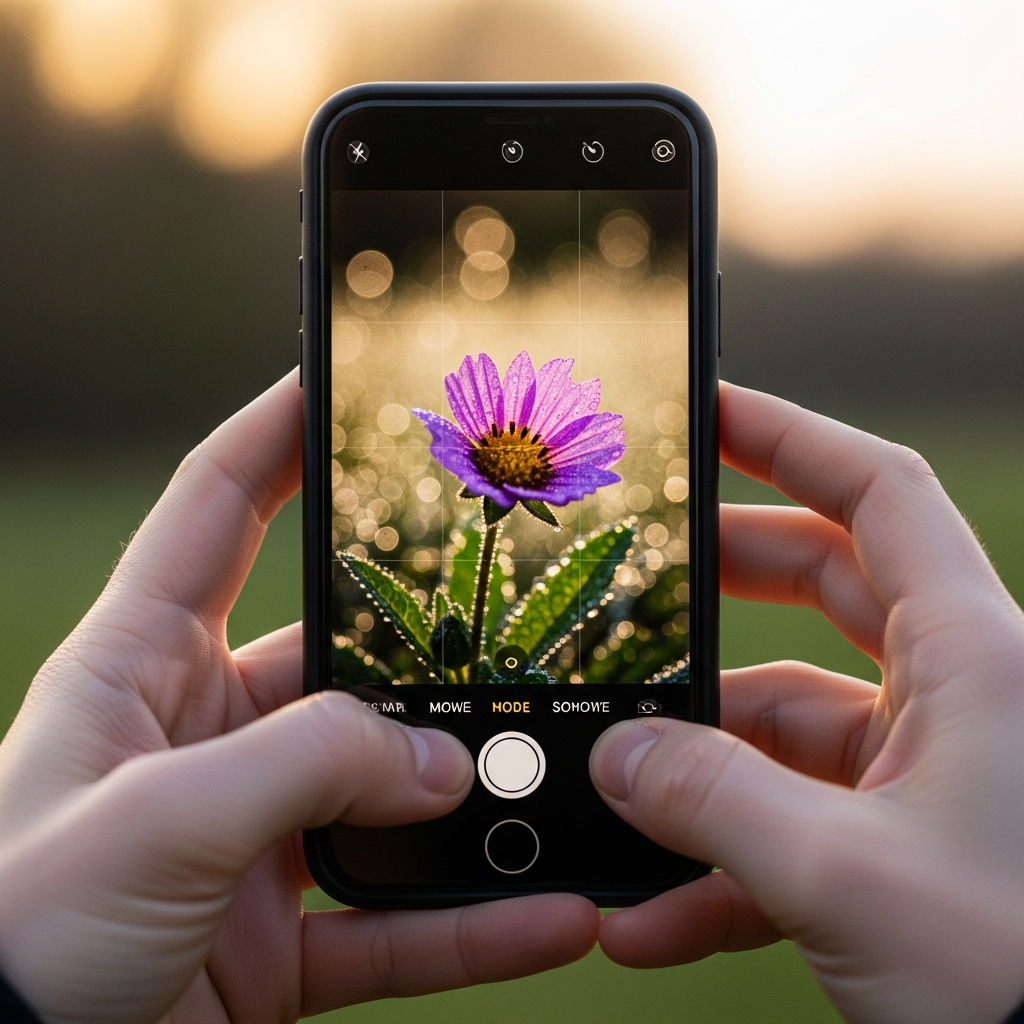
If you have ever seen a photograph where the subject is razor-sharp, but the background melts away into a creamy, soft blur, you have witnessed the beautiful effect known as bokeh. Bokeh transforms ordinary images into visual masterpieces, drawing the viewer’s eye directly to the main focal point. For years, this was a trick reserved for expensive cameras with large, fast lenses, but the technology inside your pocket has changed everything. Now, learning How to Take Bokeh Photos with Phone is completely accessible to everyone.

Understanding Bokeh in Simple Terms
Bokeh is not just “blur.” It is specifically the quality and aesthetic of the out-of-focus areas in an image. The term itself comes from the Japanese word boke (暈け or ボケ), meaning blur or haze. The magic happens when point light sources—like distant streetlights, sun glints on water, or decorative fairy lights—are rendered as soft, luminous circles or pleasing geometric shapes in the background. If you want to know How to Take Bokeh Photos with Phone, you need to think of light as a painter’s brush for the background.
The short answer to How to Take Bokeh Photos with Phone is primarily through the dedicated Portrait Mode on modern devices.
| Feature | Description | Key Tip |
| :— | :— | :— |
| Portrait Mode | Uses software (computational photography) to simulate the shallow depth of field. | Keep the subject close and the background far away. |
| Manual Mode (Pro) | Allows control over focus and sometimes aperture simulation. | Select the lowest simulated ‘aperture’ (e.g., f/1.4 or f/2.8). |
| Physical Setup | Maximize the distance between the subject and the background. | Use small light sources like fairy lights for classic bokeh circles. |
This complete guide will walk you through every method, from the simplest one-tap solution to advanced setup techniques, so you can master How to Take Bokeh Photos with Phone and elevate your mobile photography.
The Easiest Path: Mastering Your Phone’s Built-in ‘Portrait’ Mode
The single most common and effective answer to the question How to Take Bokeh Photos with Phone for the average user lies in the dedicated shooting modes found on almost every modern device. This feature, often labeled ‘Portrait Mode,’ ‘Live Focus,’ or ‘Aperture Mode,’ uses highly sophisticated computational processes to mimic the depth of field effect of professional lenses.
How Computational Photography Delivers the Blur
When you switch to Portrait Mode, your phone doesn’t physically change its lens aperture in the way a traditional camera does. Instead, it leverages its multiple camera lenses and advanced processing power. Modern high-end smartphones often utilize a dual-camera system—one for the image and a secondary camera or sensor dedicated to mapping depth. This secondary unit helps the phone determine exactly what is the foreground (the subject) and what is the background.
Once the phone has a clear depth map of the scene, the software isolates the main subject and applies an artificial, carefully crafted blur effect—the bokeh—to everything behind it. This process is incredibly fast, happening in milliseconds, which is why it’s the simplest way to learn How to Take Bokeh Photos with Phone. The best part is that many phones, such as the Samsung Galaxy line with its ‘Live Focus’ feature, even allow you to preview and adjust the intensity of the bokeh before you press the shutter button.
Getting the Best Results with Portrait Mode
While the mode does most of the heavy lifting, your setup can significantly improve the final quality of your bokeh image. It’s a common misconception that simply turning on Portrait Mode is enough. To truly nail How to Take Bokeh Photos with Phone using this built-in feature, you must understand its limitations and optimize your shot composition.
Firstly, Distance is Your Ally. The software works best when there is a clear separation between the subject and the background. If your subject is standing right against a wall, the phone’s depth sensor will struggle to create a distinct separation, and the resulting blur will look unnatural or ‘choppy’ around the edges. Try to position your subject at least six to ten feet away from the background elements. This spatial separation helps the computational system accurately define the boundaries and apply a smoother, more realistic bokeh effect. This trick is key to successfully capturing How to Take Bokeh Photos with Phone in a lifelike way.
Secondly, Focus Lock is Critical. In the Portrait Mode, you need to ensure the phone is focused perfectly on the subject’s face or eyes. A simple tap on the screen usually sets the focus. Some devices, like the iPhone, allow you to hold down on the focus point to lock it (AE/AF Lock), preventing the phone from refocusing just as you take the shot. An out-of-focus subject renders the entire image unusable, regardless of how beautiful the background blur is. This small but crucial step is part of the professional technique of How to Take Bokeh Photos with Phone.
Going Beyond Software: Achieving Natural Bokeh
While Portrait Mode is convenient, true photography purists often prefer to achieve natural bokeh, the kind that results directly from optics and physics, not from software manipulation. Even with a tiny phone lens, you can maximize your chances of capturing authentic background blur. Mastering How to Take Bokeh Photos with Phone using physical techniques gives you far more creative control and results in a more organic look.
The Physics of Natural Blur: Distance and Magnification
To generate natural bokeh with any camera, you need a shallow depth of field. Depth of field is the zone of focus in front of and behind your subject. To make this zone very shallow—and thus blur the background—there are three main factors you can manipulate, even when learning How to Take Bokeh Photos with Phone:
- Aperture (The Uncontrollable): Traditional cameras use a wide aperture (low f-number, like f/1.8). Most phone cameras have a fixed, wide aperture, which helps, but you can’t manually adjust it lower in a purely physical sense.
- Focal Length (The Zoom Factor): Longer focal lengths (zoom lenses) inherently create a shallower depth of field. If your phone has an optical telephoto (2x or 3x) lens, switching to it is an excellent way to capture natural bokeh, as the compression of the telephoto lens enhances the blur.
- Subject-to-Background Distance (The Controllable Master): This is your most powerful tool. The further your subject is from the background, the more blurred the background will become. This maxim is the single most important principle when learning How to Take Bokeh Photos with Phone without relying on software. A subject 3 feet away from your phone and 30 feet away from the background will yield a much better result than one 3 feet away from both.
The Role of Lighting and Pro Mode Settings
The most visually stunning bokeh is often seen as bright, out-of-focus circles. These beautiful discs are created when point light sources fall outside the depth of field. To make your next attempt at How to Take Bokeh Photos with Phone a success, you need to actively seek out these conditions.
- Look for Point Lights: Fairy lights, distant city lights, holiday decorations, or even sunlight filtering through leaves all serve as perfect light sources for bokeh. Shooting at dusk or dawn, known as the “golden hour” and “blue hour,” provides the best contrast for these lights to pop.
- The Power of Pro Mode: Many advanced smartphones include a ‘Pro’ or ‘Manual’ mode. While you may not be able to control the physical aperture, these modes offer control over focus. For those serious about How to Take Bokeh Photos with Phone, you should switch to Manual Focus.
Manual Focus Technique: In Pro Mode, manually set your focus to your subject. Then, observe how the background reacts. By fine-tuning the focus slider, you are essentially determining the exact plane of sharp focus. This small adjustment can sometimes create a slightly more realistic, or micro-bokeh*, than the Portrait Mode can. This is a crucial, high-level tip on How to Take Bokeh Photos with Phone.
In short, the secret to natural bokeh is to shoot close-up on your subject (a flower, a pet, or a single object) while ensuring the background is far away and contains small, bright light sources. This combination is the ultimate physical setup for anyone wondering How to Take Bokeh Photos with Phone.
The Creative Backup: Apps and Post-Production Magic
Sometimes, the lighting isn’t perfect, your phone isn’t the latest model with the best Portrait Mode, or you simply missed the shot. Thankfully, post-production editing apps have become incredibly powerful, allowing you to retroactively apply the bokeh effect to any photograph. This gives you a powerful second chance to learn How to Take Bokeh Photos with Phone and fix any issues after the fact.
Top Computational Apps for Bokeh Effect
In recent years, the market has seen a surge in specialized photography applications that use sophisticated computational methods to create incredibly convincing bokeh effects. These apps, whether you have an iPhone or an Android device, offer advanced controls that often surpass the basic adjustments available in the native phone camera app. If your default camera is failing you, this is the most reliable alternative method for How to Take Bokeh Photos with Phone.

Here is a list of highly-rated apps for creating and refining the bokeh effect:
- YouCam Perfect and PhotoDirector: These all-in-one editors offer dedicated tools to blur the background. They allow you to manually select the focal point and adjust the intensity and shape of the blur, which is a great way to fine-tune your understanding of How to Take Bokeh Photos with Phone.
- Focos: Specifically designed to add depth and bokeh to images, especially those taken on dual-camera phones. It allows you to simulate different lenses and aperture shapes, giving you DSLR-like control over the look of the bokeh highlights.
- Snapseed: A versatile editing app by Google. Its ‘Lens Blur’ tool is excellent for adding a selective blur. You can define the area of focus (circular or linear) and control the strength and transition of the blur, providing a reliable alternative for learning How to Take Bokeh Photos with Phone.
- AfterFocus: This app lets you manually draw a selection line around your subject, making it incredibly precise for defining the focal area. It then calculates and applies the background blur, which is a helpful utility when trying to master How to Take Bokeh Photos with Phone with older photos.
The Power of Manual Masking and Refinement
When using these post-production apps, you gain a level of control that even the phone’s native Portrait Mode can’t always match. The key is masking. Masking is the process of precisely drawing or painting the area you want to keep sharp versus the area you want to blur.
For example, a high-end app will allow you to import a regular photo and then use a brush tool to paint over your subject (the person, the flower, etc.). Once the mask is complete, the app can then apply a lens-like blur to everything outside that masked area. This is a deliberate, meticulous way to control How to Take Bokeh Photos with Phone results, especially for complex shots with overlapping elements where the phone’s automated system might fail. You can even choose the shape of the bokeh highlights (circles, hexagons, etc.) in some of the more advanced apps, allowing for incredible creative freedom. This is an advanced technique for mastering How to Take Bokeh Photos with Phone.
Advanced Compositional Tips to Elevate Your Bokeh Shots
Knowing How to Take Bokeh Photos with Phone involves more than just selecting a mode or an app; it requires a shift in your compositional mindset. Successful bokeh photography is about intentional framing, careful background selection, and maximizing the contrast between the sharp subject and the soft background.
Focus on Contrast and Separation
The success of your bokeh shot rests heavily on the contrast between sharpness and softness. You want the viewer’s eye to snap immediately to the subject.
- Foreground Interest: Don’t just focus on the background blur. Sometimes, having a slightly blurred object in the extreme foreground can frame your subject and further enhance the sense of depth. Think of shooting through a patch of flowers or a chain-link fence that is so close to the lens it becomes a wash of color—this is an advanced approach to understanding How to Take Bokeh Photos with Phone.
- Color Contrast: Choose a background color that complements or contrasts with your subject. For instance, a person wearing a bright red jacket against a background of soft, green, blurry trees will create a visually striking image that is immediately more engaging. This compositional trick is just as important as knowing How to Take Bokeh Photos with Phone with the right technical settings.
The Telephoto Advantage
If your smartphone has a dedicated telephoto (zoom) lens, use it! Telephoto lenses, typically marked as 2x, 3x, or 5x optical zoom on your camera interface, are physically and optically superior for producing a natural, aesthetically pleasing blur. This happens because a longer focal length compresses the scene, making the background look closer and more out-of-focus relative to the subject.
Switching to the 2x or 3x lens, then using Portrait Mode, is a powerful combination for anyone learning How to Take Bokeh Photos with Phone. This pairing often results in bokeh that is softer and more realistic than what you get from the standard wide lens’s Portrait Mode. If you are struggling to create a convincing blur, the telephoto lens is your secret weapon for capturing compelling bokeh. It is a critical piece of the puzzle on How to Take Bokeh Photos with Phone.
Practical Scenarios for Perfect Bokeh
To practice How to Take Bokeh Photos with Phone, seek out environments that are inherently conducive to the effect.
- Evening Portraits: Wait until after sunset. Have your subject stand a few feet in front of a busy street or a public plaza where distant car lights and streetlamps are visible. These point lights will transform into the classic, beautiful circles that define bokeh.
- Macro/Close-Up Shots: Photograph a single flower, a dewdrop, or a small toy. Get the phone as close as possible to the subject (using the phone’s macro mode if available). The extreme closeness to the subject will naturally reduce the depth of field to mere millimeters, making the background immediately melt away.
- The Window Light: Place your subject near a window. Position them so the sunlight catches their hair or edge, creating a ‘rim light.’ Use a reflective or busy background far behind them. The contrast in light and the distance will maximize the ability of your phone to know How to Take Bokeh Photos with Phone with a pleasing, natural-looking blur.
Common Mistakes and Troubleshooting When Learning How to Take Bokeh Photos with Phone
As you begin to experiment and truly master How to Take Bokeh Photos with Phone, you will undoubtedly run into a few common pitfalls. Recognizing and correcting these issues is a hallmark of an improving photographer. Troubleshooting is a vital part of the process when you’re figuring out How to Take Bokeh Photos with Phone.
The Unnatural ‘Halo’ or ‘Smudge’ Effect
The Problem: Sometimes, when using Portrait Mode, the edge around your subject looks too sharp, with a noticeable border or ‘halo’ where the blur begins. Worse, complex areas like hair, glasses, or the gaps between fingers might look smeared or smudged.
The Fix: This issue arises because the phone’s software is struggling to differentiate between the foreground and background. To fix this when trying to figure out How to Take Bokeh Photos with Phone:
- Simplify the Background: Move your subject away from complex patterns like tangled tree branches or fine wires. Simple, solid-color backgrounds are easier for the depth sensor to process.
- Improve Lighting: Ensure your subject is brightly and evenly lit. When the subject is well-defined by light, the phone’s depth map is more accurate, leading to cleaner edges. If you’re serious about learning How to Take Bokeh Photos with Phone, invest in a small portable light.
Edit in Post: Use one of the dedicated apps mentioned (like YouCam Perfect or Snapseed). Most of these allow you to edit the mask* after the photo is taken, letting you manually paint over the messy edges for a cleaner separation.
The Missing Light Circles (Bokehs)
The Problem: You have the blur, but you don’t have those beautiful, circular light orbs. You are wondering How to Take Bokeh Photos with Phone and get the classic look.
The Fix: Remember, bokeh circles only appear when there are small, bright point light sources in the background that are completely out of focus.
- Re-Evaluate the Background: Are you shooting against a plain wall? That will never create light circles. You need tiny lights: fairy lights, distant city lights, reflections, or sunlight hitting water droplets.
- Check the Distance: The light source must be far enough from your subject and your camera to be completely blurred. If it’s too close, it will just be a general blur, not a pleasing circular bokeh.
- Shoot in Darkness/Dusk: The contrast between the bright, small light source and the dark background is what makes the bokeh pop. This is often the best time to figure out How to Take Bokeh Photos with Phone and get those perfect orbs.
The Focus Mismatch
The Problem: You took the picture, but the part of your subject you intended to be sharp is slightly blurry, even though the background is perfectly blurred.
The Fix: You forgot to lock the focus. Even in Portrait Mode, the phone might try to refocus just before the shutter snaps. To guarantee a successful result when learning How to Take Bokeh Photos with Phone:
- Tap and Hold: Always tap on the subject’s most critical feature (usually the eyes in a portrait) and hold for a second until the focus/exposure lock appears on the screen (often indicated by AE/AF Lock). This forces the phone to maintain that exact focal plane.
- Use Manual Focus: If your phone has a Pro Mode, switch to it and manually slide the focus to ensure absolute sharpness. This is a failsafe method when trying to master How to Take Bokeh Photos with Phone.
By addressing these common issues, you will not only be answering How to Take Bokeh Photos with Phone but also developing a critical photographer’s eye, leading to much more satisfying and professional results in your mobile photography journey.
Conclusion: Elevating Your Photography by Mastering How to Take Bokeh Photos with Phone
The era when stunning photography required heavy, expensive camera gear is officially over. Today, the powerful computational capabilities and advanced lenses in your smartphone mean that learning How to Take Bokeh Photos with Phone is not just possible, but incredibly simple and rewarding. Whether you choose the ease of the automatic Portrait Mode, the artistic control of manual distance and lighting, or the saving grace of powerful editing applications, the tools are now readily available.
Mastery of the bokeh effect fundamentally changes the way you approach composition, forcing you to think about the relationship between your subject, the foreground, and the background. By consistently practicing the key principles—maximizing the subject-to-background distance, actively seeking out point light sources, utilizing your telephoto lens, and refining your focus with an AF/AE lock—you can move beyond simple snapshots. Every time you consciously set up a shot to create that beautiful, creamy blur, you are demonstrating a high-level understanding of photographic depth and attention to detail. This guide on How to Take Bokeh Photos with Phone provides the foundation; now it is up to you to experiment with your own device, explore the lighting of your environment, and use the techniques to create truly captivating images. Keep practicing How to Take Bokeh Photos with Phone, and you’ll see your mobile photography skills skyrocket.
—
FAQ (Pertanyaan yang Sering Diajukan)
What is the difference between bokeh and just a blurry background?
Bokeh is a specific term referring to the aesthetic quality of the blur in the out-of-focus parts of an image, particularly how point sources of light are rendered as soft, beautiful shapes. A blurry background can be caused by simple camera shake or poor focus. The difference lies in the pleasing look of the blurred areas: true bokeh is creamy, smooth, and artistically appealing, not just an accidental smear.
Can I get good bokeh on older phones that don’t have Portrait Mode?
Yes, absolutely. While older phones lack the computational power for automatic Portrait Mode, you can still achieve a beautiful, natural bokeh. The key is to rely on physical distance.
- Get Closer: Take a macro (close-up) shot of a small object.
- Move the Background Far: Ensure the background is several yards away.
- Use Light: Shoot with a background that has tiny, bright, distant lights (like Christmas lights or streetlights at night). The extreme distance difference will physically create a shallow depth of field, helping you learn How to Take Bokeh Photos with Phone even without advanced software.
How to Take Bokeh Photos with Phone and ensure the light orbs are perfect circles?
The shape of the bokeh highlights is determined by the shape of the camera’s aperture.
- Software-Simulated Bokeh: In Portrait Mode, the phone’s software usually defaults to a circular simulation for the most pleasing look.
- Natural Bokeh: Smartphone lenses have a fixed, wide, and usually circular aperture, which naturally produces round orbs.
To maximize the effect and ensure you know How to Take Bokeh Photos with Phone perfectly, make sure the background lights are small and bright, and that the background is very far away from your subject. You can also use editing apps like Focos to manually choose the shape of the simulated aperture.
Is it better to use the main wide lens or the telephoto lens when trying to figure out How to Take Bokeh Photos with Phone?
The telephoto lens (often labeled 2x or 3x) is generally better for creating a more natural and visually appealing bokeh effect. A longer focal length naturally compresses the background and reduces the depth of field, leading to a creamier blur. If your phone’s Portrait Mode defaults to the telephoto lens, use that one. If not, manually switch to the 2x or 3x lens in the standard camera app and try to get close to your subject for an excellent shallow depth of field effect. This provides a professional answer to How to Take Bokeh Photos with Phone.